
Your staff spend their shift inside the game, not in a browser tab. Every time a report comes in, the old routine was the same: alt-tab, find the player on the dashboard, act, alt-tab back and hope nothing happened in the meantime. The in-game admin menu removes the round trip. Type rac and the parts of the Raven panel a moderator needs during a shift are on their screen, inside the server they are already playing on.
One command opens it
Typing rac in game with nothing after it opens the menu, and typing it again closes it. There is no key to bind and nothing to add to server.cfg. Run it from the server console and it answers that the menu only opens in game, and points you at rac help for the console commands.
The menu needs resource 1.8.9 or newer. Raven updates itself on most servers, and updating Raven covers the cases where it needs a hand from you.
Five pages that mirror the dashboard
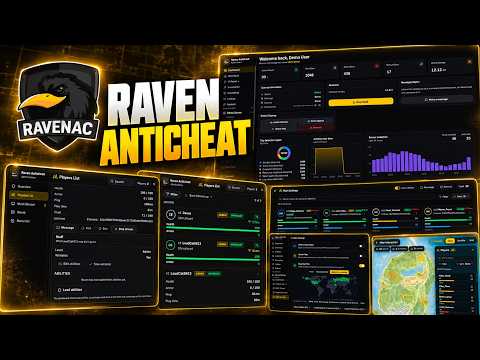
The menu does not invent its own layout. It copies the dashboard, so a moderator who knows one already knows the other, and a filter means the same thing in both.
- Overview. Protection and uptime at a glance, how trust is spread across the server, a players-online chart, the lowest-trust players worth watching, and the message composer.
- Players List. Everyone connected, with trust, ping, play time and vitals. Pick a player to kick, ban, watch their screen or message them.
- Multi Stream. Up to six player screens side by side, for when one suspect is not enough.
- World. Clear peds, vehicles or objects when someone floods the map, plus the same message composer.
- Bans List. The active bans, each one opening to its evidence, and lifting one when it should not stand.
A search box in the header finds a player or a ban by name or id. Players List, Multi Stream and Bans List each carry their own Filter and Sort, built on the same bands as the dashboard, so "admins with a high ping" or "detection bans from the last week" is a couple of choices rather than a scroll.
Acting on a player
Kick and Ban never fire on a single click. Each opens a small composer first. A kick can go out without a reason. A ban cannot: the button stays disabled until you write why, and the game server checks for a reason again when the request arrives, so a ban with nothing behind it is refused at both ends.
Levels are respected the same way. A Moderator can act on anyone who is not staff, an Admin can also act on a Moderator, and nobody can act on their own level or on themselves. A button you are not allowed to use is shown disabled with the reason on hover, not hidden, so every moderator sees the same panel and nobody wonders whether a button exists.
Live stream opens a player's screen from the same panel. From resource 1.9.2 it also works on yourself, which is a quick way to see what a stream shows before you rely on one. A stream that fails to open or gets cut off now says why on its tile.
Messages and announcements
The Overview and the World page share one composer with two modes. A direct message goes to the players you pick, up to twenty at once. An announcement goes to every screen on the server. Both carry the name of the admin who sent them, and both are rate limited. Text is trimmed by characters rather than bytes, so a message in Cyrillic, Chinese or any other non-Latin script arrives whole.
Who gets the menu, and what they can do in it
Access is decided on the dashboard and nowhere else. Under Management, open In-Game Moderators, add the player, tick In-game staff and tick the abilities they need. Opening the menu needs players:view, which puts all five pages in the sidebar, and every action inside them reads its own ability: kicking, banning, streaming, messaging, announcing, viewing and lifting bans, and clearing each kind of entity are all separate ticks. A new staff row starts with view, kick, stream and viewing bans, and you add the rest per person.
Staff you tagged before abilities existed were moved over as Moderators with only players:view and bans:view, so they can open the menu and read, and every kick, ban, stream, unban and clear is refused until you re-grant them. Each of those rows shows what that person could do before, and Grant previous abilities writes it back in one click.
An add_ace line no longer opens anything either, because the old rac.* rights were replaced by these abilities. And dashboard access and in-game staff are separate lists, so a dashboard admin does not get the menu until you give them an in-game row as well. Clearing the world is the one action the dashboard approves too, so a moderator who clears also needs a dashboard account, linked through their Discord, that holds the same World ticks.
Changes land fast. Take an ability away on the dashboard while someone has the menu open and it is gone from their screen within a couple of seconds, not at their next connect.
When the connection drops
The game server pushes fresh data to the menu every two seconds. If those pushes stop, the menu says so instead of quietly showing a frozen list: Connection lost when the server goes silent, No network connection when your own machine is offline, and Cloud unreachable inside the Bans List when only the ban fetch failed. Every one of them clears on its own with the next push. There is nothing to reload.
Settings that never leave the session
The cog at the bottom of the sidebar opens Menu Settings: text size, keeping your game controls while the menu is open so you can walk and look around with it up, and locking the window in place. None of them is saved. They reset the next time you connect, because a setting stored on a player's machine is one more thing for a cheat to read.
What stays on the dashboard
The menu covers the players in front of you. Settings, resources, the map and the admin list stay on the dashboard, and those abilities cannot be put on an in-game row at all, so giving a moderator the menu never gives them your configuration. The one-shot screenshot is a dashboard tool as well.
Try the panel it mirrors
Every page of the menu has its twin in the web panel, and you can click through that panel with demo data in the live demo, no account needed. The commands reference covers every page, ability and limit of the menu, and admins and moderators covers who can hand out which ability.